
Case study — Web Tool · Organic Search
Chronological Age Calculator
Chronological Age Calculator is a free web tool for clinicians, educators and parents who need an exact age in years, months and days between a birth date and a test date — the number Pearson, Super Duper and other assessments ask for. I built it as a search product on Next.js: a small site engineered for one query family, with the structured data and performance to rank on it. Google Search Console for 23 June to 22 September 2026: 508,000 impressions, 1,440 clicks, average position 5.6.
- Role
- Full Stack Developer
- Period
- 2026
- Services
- Web Application · Programmatic SEO · Schema Markup · Performance
- Stack
- Next.js · React · TypeScript · Tailwind CSS
- Live site
- chronologicalage-calculator.com
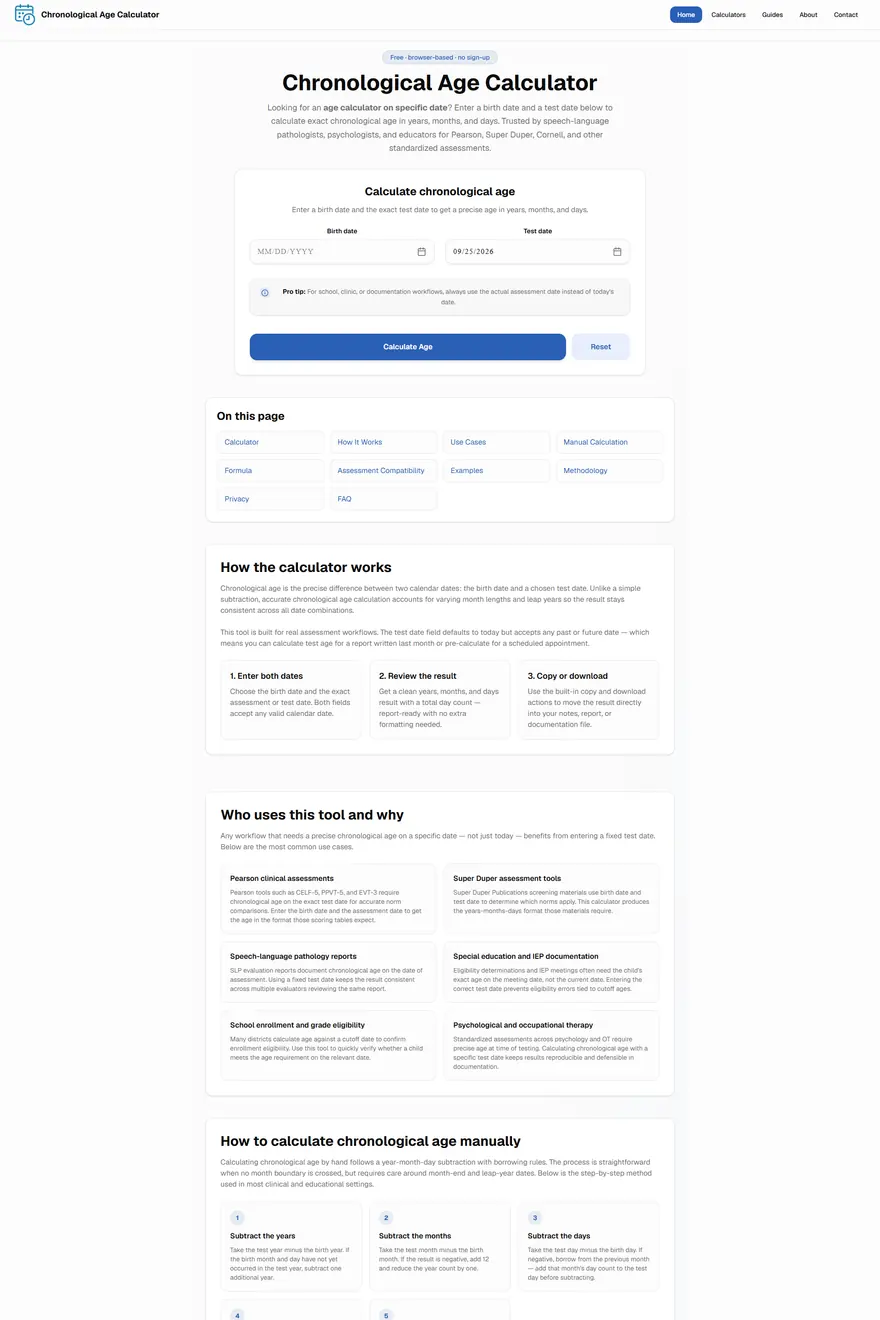
Live build — hover to pan
01
The Challenge
"Chronological age calculator" is a query with steady clinical and educational demand and a crowded first page — established calculator sites, university pages and PDF worksheets. A new domain has to earn a place with something better than the incumbents, not just another form.
The audience is specific. Speech-language pathologists, psychologists and teachers need the age at the date of testing, not today, and they need it in the years-months-days format assessment manuals use. Getting that detail right is the product.
02
The Strategy
One site, one query family. Instead of a general tools portal, every page serves a variant of the same intent: the core calculator, an age-difference calculator, a birthday countdown, and six guides that answer the questions people search alongside the tool — how to calculate chronological age manually, chronological versus biological age, how the Cornell and Pearson forms want it written.
Structured data was part of the plan from the first commit: WebApplication and Organization schema for the tool, FAQPage for the eight questions answered on the page, ImageObject for the share image. The FAQ markup is there so the answers are easy for search and AI engines to extract, not because Google still shows FAQ dropdowns — it stopped in May 2026.
03
The Design
The calculator is the first thing on the page: two date fields, one result in the exact format assessments use, nothing above it to scroll past. Explanation, worked examples and the FAQ follow underneath for the people who want them.
Tailwind CSS keeps the layout light. There are no hero graphics, carousels or animation libraries; the page exists to answer one question quickly on a phone.
04
The Development
Built on Next.js and React in TypeScript, pre-rendered so every page is static HTML. Sixteen URLs in the sitemap: the three calculators, a calculators index, six blog guides, and the about, contact and policy pages.
Each guide and calculator page carries its own title, description, canonical and schema, and the pages link to each other with descriptive anchors so that authority earned by the main calculator flows to the rest of the site.
05
The SEO
The measured result, from Google Search Console for the three months to 22 September 2026: 508,000 impressions, 1,440 clicks, average position 5.6. Daily impressions climbed from a few hundred in late June to around 12,000 by mid-September.
The head term "chronological age calculator" delivered 284 clicks from 86,669 impressions. Long-tail variants behave very differently: "cornell age calculator" converted 1,641 impressions into 103 clicks, while "age calculator cornell" showed 226,875 times for 79 clicks — the same audience, but a broad query where the page sits below the fold. That gap is the next piece of work: titles and snippets tuned for the Cornell and Pearson intents, where the impressions already exist.
06
The Performance
A static Next.js page with no client-side framework work beyond the calculator itself, system-light CSS and no third-party scripts in the critical path. The site is served pre-rendered, so time to first byte is a file read and the calculator is interactive as soon as the small bundle arrives.
07
The Result
Three months after launch the site holds an average position of 5.6 on Google for its query family, with 1,440 visits from 508,000 impressions and a rising trend. Those are owner-verified Search Console figures, quoted with their date range.
The honest reading of the numbers: the site has earned visibility faster than clicks. A 0.3% click-through rate on half a million impressions means the ranking work is done and the snippet work is next.
Services behind this project
Next Step
Have an idea worth building?
Let's turn it into something people remember — and search engines can understand.
Usually replies within a day · Lahore, Pakistan · working worldwide
View my work